Private finance tracking for budgeting, wealth, and investments.
NorthVault is a personal finance app for budgeting, cash flow, net worth, wealth tracking and investment tracking.
NorthVault helps you track spending, plan budgets, monitor cash flow, follow your net worth and manage your broader financial picture from one app.
The core finance workflows, together.
NorthVault supports manual transactions, flexible budgets, savings goals, wealth snapshots, investment records, imports, exports, backups, and privacy controls in one private iPhone app.
Build spending plans that fit your lifestyle.
Category budgets support weekly, fortnightly, monthly, quarterly, yearly, custom, and salary-cycle periods, with budget-vs-actual views as you go.
Monitor assets, liabilities, and net worth over time.
Accounts, real estate, investment holdings, mortgages, credit cards, custom assets, liabilities, history, and snapshots help you see your wealth picture over time.
Track investment records alongside your budget and net worth.
Investment accounts, transactions, derived holdings, allocation, concentration, dividends, activity, and CSV import help keep investment records alongside everyday finances.
Review your transaction history in one place.
Manual income, expenses, transfers, refunds, negative expenses, split transactions, tags, notes, search, and filters keep the record usable without mandatory bank linking.
Turn your own records into clearer summaries.
Spending trends, budget summaries, savings-rate views, recurring merchant foundations, and plain-language summaries help explain what changed.
Stay focused on savings goals and financial milestones.
Savings goals, category management, visibility controls, CSV import/export, backup and restore, and biometric/device lock support round out the core experience.
A private finance app that keeps the main records together.
NorthVault is designed for people who want budgeting, wealth tracking, investment records, and data ownership in one calm Apple-native experience.
Budgeting, wealth, and investments together
Track spending plans, transactions, goals, net worth, and investment records without splitting your financial life across separate apps.
Local-first private records
Core use is built around records stored on your iPhone, with no account required and no cloud sync required to use the app.
No mandatory bank linking
Manual entry and CSV import remain central. Connected accounts are not required, and future connection ideas are treated as optional and exploratory.
User-owned import, export, backup, and restore
Bring records in, export records out, keep local backups, and restore when needed. Your records are not locked behind a proprietary account.
Built natively for iPhone
NorthVault follows iOS conventions, supports device-level lock options, and keeps the iPhone experience focused on quality.
Designed to grow carefully
The long-term direction is a broader Apple-native finance platform, with iPad, Mac, sync, connected accounts, and advanced reporting handled as future work.
Built with privacy in mind.
Your financial information belongs to you. NorthVault is designed to keep you in control — from the first entry to the last review.
Local-First Design
NorthVault is designed to work with your data on your device. The app doesn't require an account or cloud sync to function — your finances live where you do.
You Decide What Goes In
Enter your information manually, on your terms. NorthVault gives you control over what you track, how you categorize it, and what stays private.
Your Data Belongs to You
NorthVault doesn't claim ownership of the financial information you enter. You can manage, review, or remove your data at any time — no questions asked.
No Ads. No Trackers.
NorthVault is built for people who value privacy and transparency. There are no ads or tracking-based business models behind the app you're using.
NorthVault in action.
A closer look at what NorthVault feels like every day — built for iPhone, designed for clarity.
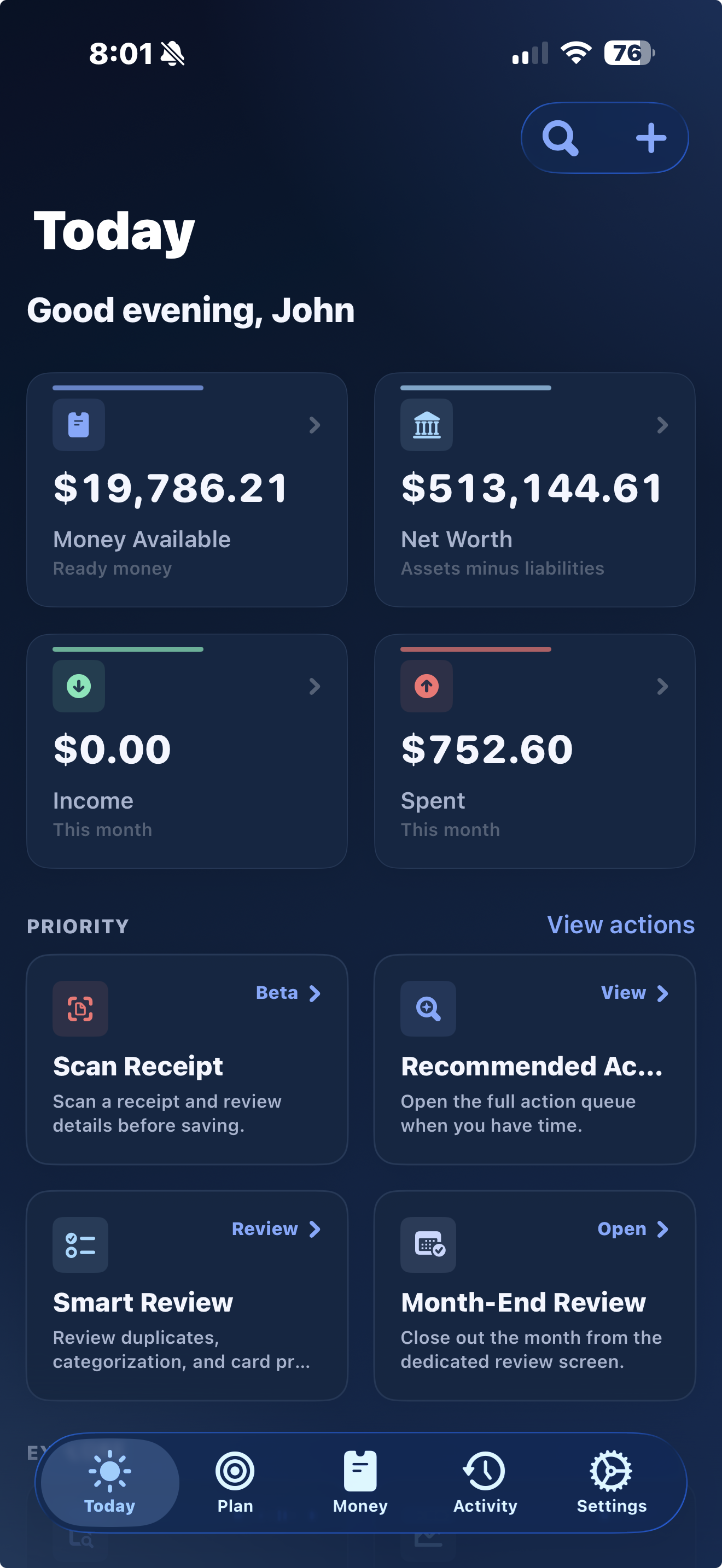
See your financial position at a glance.
Money available, net worth, spending, review actions, and next steps — the essentials for understanding where you stand when you open the app.
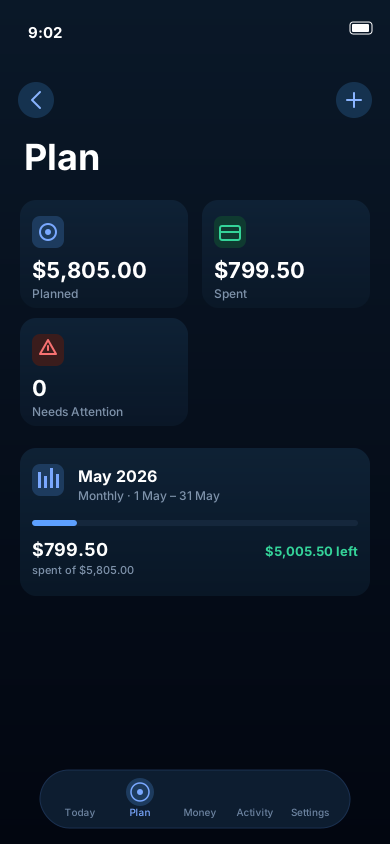
Build a spending plan that actually works.
Allocate by category and see planned amounts alongside spending to date — so every dollar has a clear place to be, and you always know what's left.
Net worth, assets, and liabilities — all in one view.
Cash, bank accounts, real estate, investment holdings, mortgages, and credit cards brought together so your full financial position is always clear in one place.
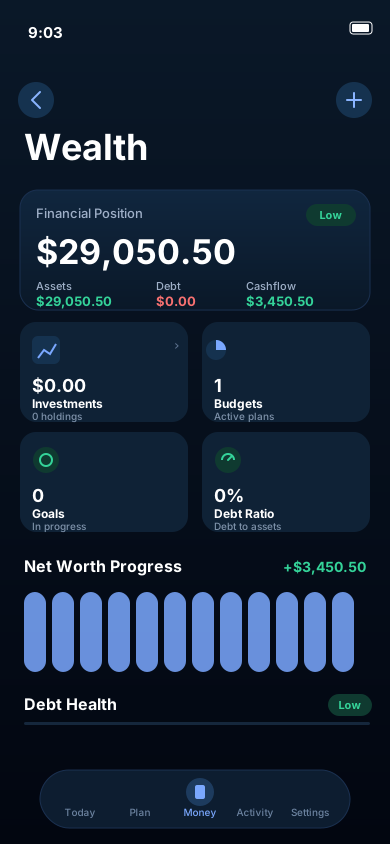
Your investment records — alongside your budget and net worth.
Investment tracking is included in NorthVault. Record accounts, transactions, holdings, allocation, concentration, dividends, DRP activity foundations, imports, and portfolio health checks in the same app as your everyday finances.
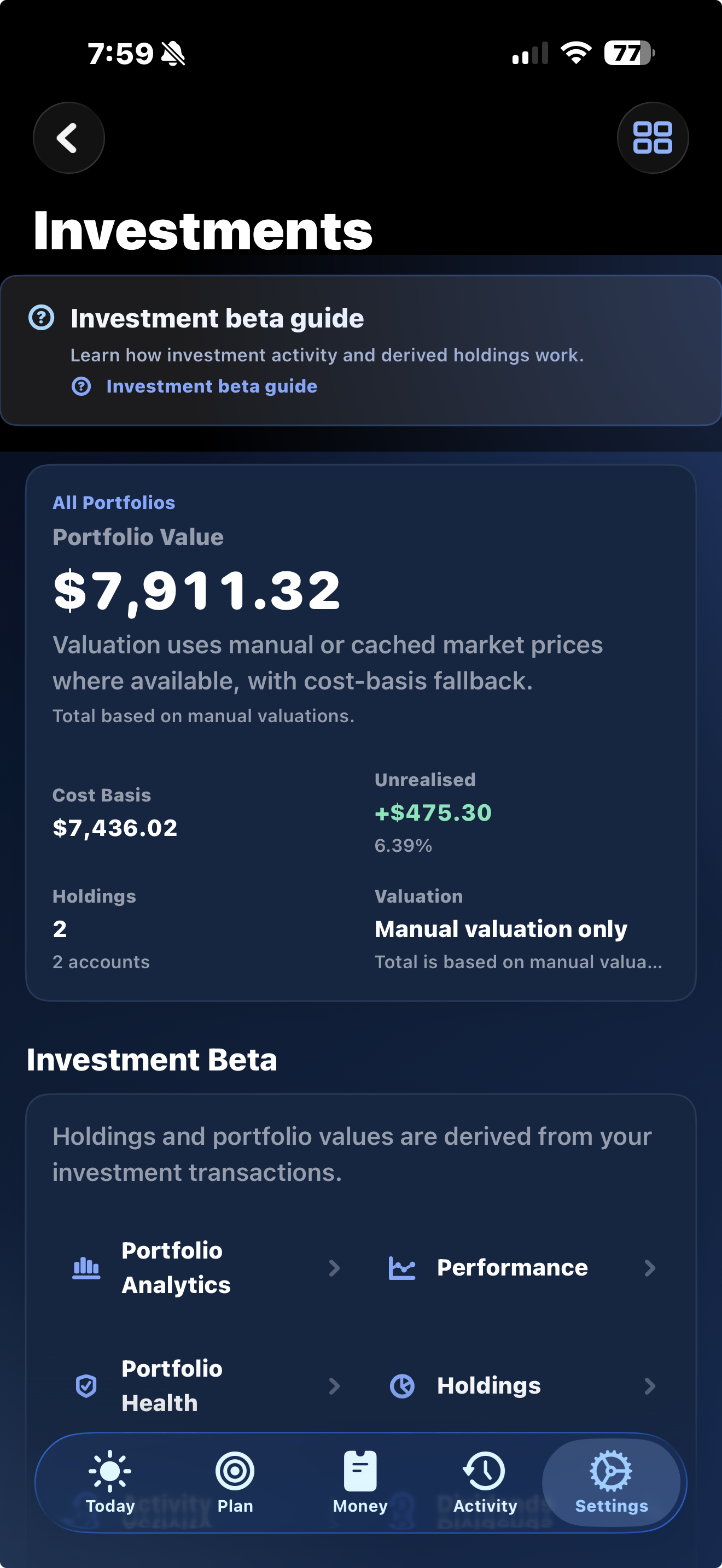
Investment Accounts & Holdings
Track accounts and holdings as part of your wider wealth records.
Investment Transaction Ledger
Record buys, sells, dividends, transfers, adjustments, and other activity.
Derived Holdings
Holdings can be derived from the transaction ledger rather than maintained separately.
Portfolio Allocation
Review how holdings are distributed across portfolio views that may continue to be refined.
Portfolio Concentration
Spot concentration across holdings and review balance as the analytics mature.
Portfolio Activity
Dedicated views help you review investment activity and holdings history.
Dividend Tracking
Record dividends and keep a clearer income history beside your portfolio records.
DRP Foundation
Dividend reinvestment records are supported as a foundation that will keep improving.
Investment CSV Import
Import supported investment records from files while broker workflows are refined.
Portfolio Health Checks
Review tools surface concentration and imbalance cues for your own review.
Tax Readiness Foundations
Structured records are being shaped to support future reporting workflows, not tax advice.
FX & Price Record Foundations
Reference data, FX rate handling, and price records are foundations, not live market sync.
Connect today's spending to tomorrow's goals.
Set meaningful savings targets and category budgets that link what you spend now to what you're working toward.
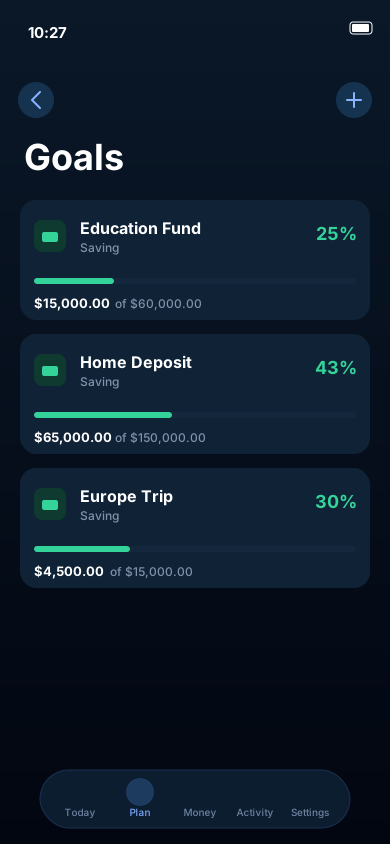
Stay focused on what you're saving for.
Education funds, home deposits, and travel goals can each be tracked with target amounts and real progress indicators — so you always know how close you are.
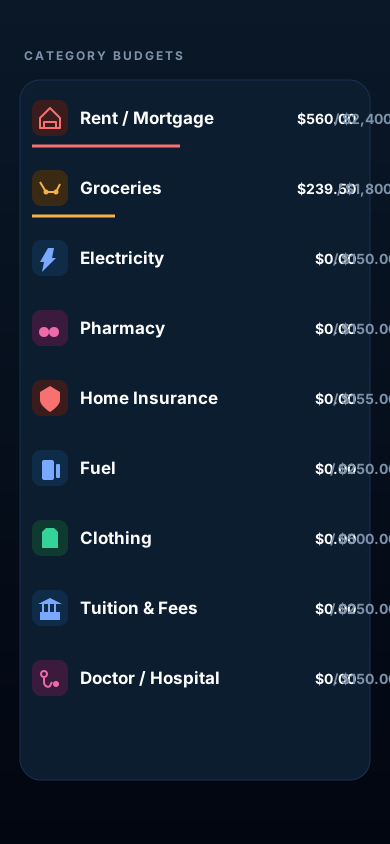
Understand exactly where your money goes.
Groceries, healthcare, fuel, and any custom category show planned amounts alongside spending — so there are no surprises at month end.
A clear record of what changed.
Transactions, reports, trends, and summaries — all organized chronologically so you can understand what shifted over any period without digging through data.
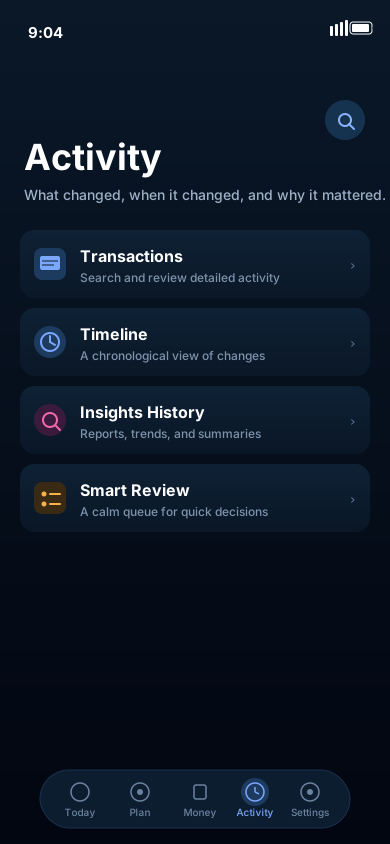
Clearer summaries from the records you already keep.
NorthVault helps turn your own records into clearer summaries — highlighting spending patterns, budget pressure, recurring merchants, savings trends, and wealth movement without requiring automatic bank linking.
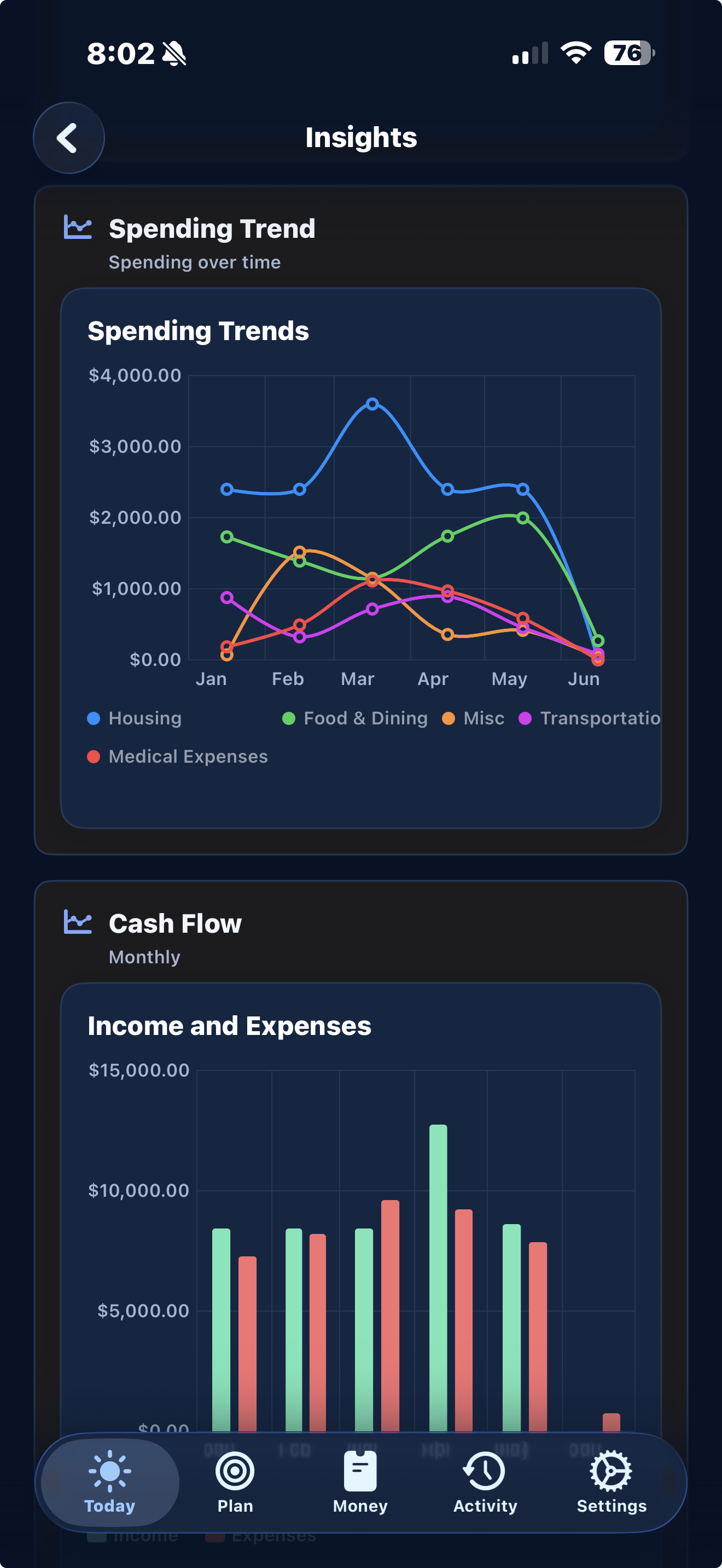
Spending trends
Review changes in income, expenses, categories, and cash flow across the periods you choose.
Budget summaries
See budget pressure, remaining amounts, and budget-vs-actual context without opening a spreadsheet.
Savings-rate insights
Track savings trends and goal progress using the data you enter and import.
Recurring merchant detection
Recurring merchant and regular expense foundations help surface patterns that are easy to miss manually.
Subscription foundations
Recurring expense and subscription views are being refined around clear detection, review, and user control.
Plain-language summaries
Insights are written to explain your records in everyday language, while staying grounded in the data you control.
Your records stay yours.
NorthVault is built on one principle: your financial records belong to you. CSV import, CSV export, local backup, restore, and record management workflows help you keep practical control of your data.
CSV Import
Bring supported transaction and investment history into NorthVault using CSV files. No bank connection is required.
CSV Export
Export your transactions and financial records at any time. NorthVault is designed to avoid proprietary lock-in.
Backup & Restore
Create local backups of your NorthVault database and restore them when you need to transfer or protect your records.
Local-First Storage
Your financial data is stored on your device for core use. NorthVault does not require cloud sync or an account to function.
No Mandatory Account or Ad Model
NorthVault doesn't require sign-in for core use, and the app is not built around ads or tracking-based monetisation.
User-Controlled Records
Add, edit, delete, and export the records you enter. NorthVault does not claim ownership of your financial information.
Built for iPhone first.
NorthVault is a native iOS app built around Apple-platform conventions, device-level privacy controls, and a focused iPhone experience before broader device support is considered.
Native iOS App
Designed for iPhone with native navigation, controls, forms, and interaction patterns.
Device-Level Lock
Use supported biometric or device authentication options to protect access to the app.
Apple Vision OCR Foundations
Receipt scanning foundations use on-device Apple Vision OCR where supported, with workflows still being refined.
Siri & Shortcuts Foundations
Quick-entry and summary workflows are being shaped around Siri and Shortcuts foundations where appropriate.
Future iPad Direction
Larger-screen layouts are being explored after the iPhone experience is more mature.
FutureFuture Mac Direction
A Mac or Catalyst experience is longer-term direction, not a released Mac app.
FutureWhy NorthVault exists.
NorthVault started as a personal project. After years of wanting a calmer way to manage budgeting, wealth, and investment records together, it became clear that a different kind of app was needed — one that combined those workflows in a privacy-respecting experience.
The goal was clear: build a personal finance app for everyday budgeting, long-term wealth tracking, and investment records with clarity, privacy, and calm design. Calm, well-designed, and genuinely useful.
NorthVault is moving toward public App Store release and continues to be shaped with user feedback. Every improvement is driven by people who care about getting personal finance right. The roadmap is transparent, the development is active, and development beta feedback helps shape upcoming releases.
Built for people who want budgeting, wealth tracking, and investment records in one private iPhone experience — with clear structure and control of their data.
Where NorthVault is heading.
A transparent look at what is included, what is being refined, and what remains future or exploratory — no dates, no overpromising.
Planned for the Free Public Version
Core workflows planned for the free public version, with details still subject to refinement before and after App Store release.
Manual Income, Expense & Transfer Tracking
Enter income, expenses, account transfers, refunds, and negative expenses manually.
Account & Balance Tracking
Track cash, bank, investment, and other account records with clear balance views.
Tags, Notes, Search & Filtering
Use transaction tags, notes, search, and filtering to keep history review practical.
Account Transfers
Record transfers between your own accounts without distorting income or expense totals.
Split Transaction Support
Split supported transactions across categories or records for more accurate tracking.
Budget Setup by Category
Create per-category budgets and compare planned spending against actual in real time.
Flexible Budget Periods
Weekly, fortnightly, monthly, quarterly, yearly, custom, and salary-cycle budgets are supported.
Salary-Cycle Budgeting
Align budgets to your pay cycle so planning always reflects when money actually arrives.
Budget-vs-Actual Views
See how spending compares to each budget target for the current period at a glance.
Category Visibility & Management
Show, hide, reorder, and manage spending categories to keep your view clean and focused.
Wealth & Net Worth Overview
Total assets, liabilities, and net worth calculated and summarised in one clear view.
Assets & Liabilities Tracking
Cash, bank accounts, investments, real estate, mortgages, credit cards, loans, and custom liabilities.
Net Worth History & Snapshots
Track how your net worth changes over time with historical snapshots and trend views.
Savings Goals
Track target amounts and progress for the savings goals you define.
Smart Summaries
Review spending trends, budget pressure, savings-rate context, and wealth movement from your own records.
CSV Import & Export
Import supported CSV files and export records so your data remains portable.
Local-First Private Data
Your data lives on your device for core use. No account, cloud sync, or bank connection is required.
Biometric / Device Security
Supports device-level lock options where available on your iPhone.
Backup & Restore Support
Create local backups and restore your NorthVault data when you need to transfer or protect it.
Investment Tracking
Track investment accounts, transactions, holdings, dividends, and portfolio activity.
Portfolio Analytics
Allocation, concentration, activity, and health-check views are included and may continue to mature.
Receipt Scanning Foundations
Apple Vision OCR receipt-scanning foundations are present where supported, with workflows still being refined.
Siri & Shortcuts Foundations
Quick-entry and shortcut foundations are being shaped around Apple-platform workflows.
In Active Development / Being Refined
Areas under active refinement, especially where real-world data volume, import formats, reporting depth, and Apple-platform workflows need more testing.
Investment Scalability
Performance and accuracy improvements for larger holdings, transaction histories, and portfolio datasets.
Investment Transaction Ledger Refinement
Ongoing improvements to buy, sell, dividend, DRP, transfer, and adjustment workflows.
Derived Holdings from Transactions
Holdings and quantities are derived automatically from the investment transaction ledger.
DRP Workflows
Dividend reinvestment workflows are being refined so reinvested income and quantities remain understandable.
Portfolio Allocation & Concentration
Visualise how your portfolio is allocated across holdings, sectors, and asset types.
Portfolio Health Checks
Flags and guidance designed to help you notice potential concentration or imbalance issues.
Investment Activity & Holdings Views
Dedicated views for investment activity history and current holdings with key details.
FX Rate Management Foundation
Early groundwork for managing foreign exchange rates across international holdings.
Portfolio Reporting
Allocation, activity, income, and portfolio review reporting are being improved for clarity and scale.
Tax Readiness Foundations
Structured records are being shaped to support future reporting workflows. NorthVault does not provide tax advice.
Broker & Import Workflows
Broker file formats, investment CSV import, mapping, validation, and larger imports are being refined.
Performance for Large Datasets
Ongoing improvements to speed and responsiveness when working with many transactions.
Dashboard & Wealth Performance
Optimising dashboard load time and wealth overview rendering for smoother everyday use.
Import Reliability
Stability and accuracy improvements for larger transaction and investment CSV files.
Help & Guidance Screens
In-app contextual help screens to assist users in understanding key workflows.
Improved Wording & Onboarding Clarity
Refining labels, tooltips, and onboarding flows so the app is easier to understand from day one.
Apple Vision Receipt Scanning
Receipt scanning and extracted transaction fields are being refined around on-device Apple Vision OCR.
Siri / Shortcuts Workflows
Quick-entry, quick-summary, and Shortcut-friendly workflows are being refined conservatively.
Larger-Screen Layouts
Layout foundations for larger screens are being explored while the iPhone experience remains the priority.
Mac / Catalyst Foundations
Early platform groundwork only. NorthVault has not released a full Mac app.
Future / Exploratory
Longer-term ideas being explored or planned carefully. These are not release promises, and no dates are implied.
Open Banking / Connected Accounts
Optional connected accounts are exploratory and would depend on provider availability, consent, cost, and compliance.
iCloud Sync
Sync is a longer-term direction, subject to privacy, reliability, and user-control requirements.
Full Mac App
A full Mac app is exploratory. The current focus remains iPhone.
Live Market Pricing
Live or regularly updated market pricing is exploratory and is not part of the current public app.
Subscription Tiers / Premium Features
Paid tiers may be explored later. No subscription promise or pricing is being made here.
Advanced Tax Engine
A full tax engine is longer-term and would need careful validation. NorthVault does not provide tax advice.
Franking Credits
Future support for recording and reporting franking credits is exploratory.
Full CGT Parcel Reporting
Detailed parcel and capital gains reporting is a future area, not a completed public feature.
Corporate Actions
Stock splits, consolidations, mergers, and other corporate actions remain future work.
Multi-Currency Expansion
Broader currency support and reporting across international holdings remain longer-term work.
Advanced Investment Reporting
Deeper performance, income, and tax-adjacent reports are longer-term reporting work.
Broker Integrations
Direct broker integrations are exploratory and are not available in the current public app.
Forecasting & Scenario Modelling
Forecasting remains future work and would need to stay clearly informational.
Plain-Language Queries
Natural-language questions over your own records are exploratory, with privacy and accuracy as constraints.
Dividend Forecasting
Dividend forecasting is a future idea, not a current income prediction feature.
Expanded Portfolio Review
Deeper portfolio review, benchmarks, and advanced analytics remain longer-term possibilities.
Expanded Import Centre
A broader import centre for complex files may be explored after core import reliability matures.
Common questions.
What to know before the App Store release and development beta testing.
NorthVault is a personal finance app for iPhone that brings budgeting, cash flow, net worth, wealth tracking, goals, investment records, imports, backups, and smart summaries together in a privacy-focused experience. The free version will be available soon on the App Store.
NorthVault is designed for iPhone. The free public version will be available soon on the App Store. Development beta builds may be available separately through TestFlight for users who want to help test upcoming features.
NorthVault is designed for iPhone. Larger-screen support is something being explored as the app continues to mature. The current focus is on making the iPhone experience excellent first.
Development beta builds may be offered through TestFlight for testing upcoming features and improvements. TestFlight builds are development versions and may contain unfinished features, temporary issues, or changes that differ from the App Store version.
Use the TestFlight development beta link when it is available. Beta builds are for development feedback and are separate from the free public App Store version.
NorthVault uses manual entry and supported CSV import for transactions. Automatic bank linking is not required for core use, and any future connected account features would be optional.
Your data is stored on your device for core use. NorthVault is built with a local-first design — the app doesn't require account creation or cloud sync, and includes export, backup, and restore workflows so your records stay under your control.
NorthVault includes investment record workflows for accounts, holdings and transactions, allocation and concentration review, dividends, supported imports, and portfolio activity. These features may continue to be refined, and NorthVault does not provide tax advice.
Expanding to additional Apple devices is a longer-term direction. NorthVault is focused on the iPhone experience first, and no full Mac app is currently released.
The public app and development beta builds may receive updates as the app improves. Feedback from development beta testers helps shape upcoming changes before they reach public release.
App available on the App Store.
The free version of NorthVault will be available soon on the App Store. Development beta builds may be available through TestFlight for users who want to help test upcoming features before release.